
POS & inventory solutions
Sell faster, track stock accurately and see what is happening in your store
A point-of-sale and inventory setup shaped around your products, your team and your counter, with receipt printing, stock alerts and reports you can actually use.
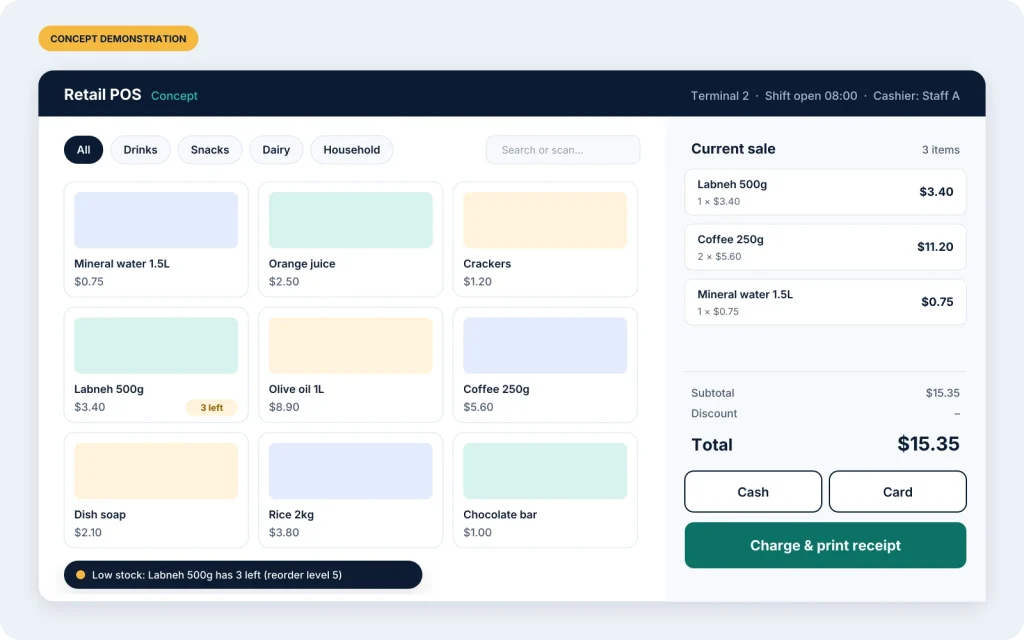
What your POS can include
We choose the features with you. Some are part of our base approach; others are configured or developed for your project. The proposal states exactly which is which.
Sales & receipt printing
Quick product search or barcode scanning, discounts, cash and card payments, and printed receipts.
Products & stock
Products, categories and prices in one place, with stock that updates as you sell and receive goods.
Low-stock notifications
Set a reorder level per product and get notified before you run out, not after.
Employee access & shifts
Individual logins, permissions by role, and shift opening and closing, so you know who sold what and when.
Multiple terminals, one database
Several checkout points sharing a local database, so stock and sales stay consistent across the store.
Reports & accounting
Daily and period reports, plus accounting-related features or integrations, depending on project scope.
Questions we will ask you
A good POS depends on details. During discovery we go through questions like these, so the system fits your counter on day one.
- Do you price in USD, LBP or both, and how do you give change?
- What should happen during a power or internet cut?
- Which receipt printers, barcode scanners and cash drawers do you already have?
- How many terminals and staff members, and who may give discounts or refunds?
- Which reports do you or your accountant need each day or month?
A good fit for
- Retail shops and mini-markets
- Cafés, bakeries and snack shops
- Hardware, electronics and specialty stores
- Businesses outgrowing a cash register and spreadsheet
What a POS demo includes
A walkthrough of our POS approach and what exists today, a conversation about your store, and a clear view of what would be configured or built for you. There is no obligation.
How we work
A clear process from first call to ongoing support
You always know what is being built, what it costs and what happens next.
Discovery
A conversation about how your business works today, what slows you down and what a good result looks like.
Proposal
A written proposal with scope, milestones, timeline and cost. Nothing starts until you agree to it.
Development
We build in short stages and show you working progress, so feedback arrives early rather than at the end.
Testing
We test with realistic data and your actual devices, such as receipt printers and phones, before anything goes live.
Launch
We install, move your existing data where possible, and train your team on day-to-day use.
Support
An agreed support arrangement for fixes, updates and help, plus a plan for the next improvements.
Tell us what is slowing your business down
Send a short description of your project. We will reply to arrange a discovery call, and if there is a good fit you will receive a written proposal.